Apple odrzuciło aplikację, ponieważ umożliwia ona logowanie za pośrednictwem zewnętrznego dostawcy, takiego jak Google lub Facebook, ale nie oferuje równoważnej opcji logowania spełniającej wymagania Apple dotyczące prywatności (w praktyce jest to „Zaloguj się przez Apple”).
W przypadku większości aplikacji opartych na witrynach najprostszym rozwiązaniem jest usunięcie z aplikacji opcji logowania przez media społecznościowe i umożliwienie użytkownikom logowania się za pomocą własnego systemu kont w Twojej witrynie.
Ukryj przyciski logowania przez zewnętrznych dostawców
Najpierw upewnij się, że użytkownicy mogą utworzyć konto i zalogować się bez korzystania z zewnętrznego dostawcy logowania, na przykład przy użyciu adresu e-mail i hasła. Obecni użytkownicy, którzy pierwotnie zarejestrowali się przez Google lub Facebooka, również muszą mieć możliwość uzyskania dostępu do swoich istniejących kont.
Możesz usunąć przyciski logowania przez media społecznościowe ze swojej witryny lub ukryć je tylko w aplikacji. Otwórz ustawienia dostosowywania witryny swojej aplikacji.Nasz przewodnik wyjaśnia, jak ukrywać elementy witryny za pomocą selektorów ukrywania elementów.
Sprawdź wszystkie miejsca, w których użytkownicy mogą się logować lub tworzyć konto, w tym strony logowania i rejestracji, strony płatności oraz wyskakujące okna logowania. Ukryj w każdym z tych miejsc opcje logowania przez zewnętrznych dostawców, pozostawiając dostępny własny formularz logowania.
Alternatywa: zachowaj logowanie przez media społecznościowe
Jeśli logowanie przez media społecznościowe jest ważne dla Twojej aplikacji, możesz zintegrować funkcję „Zaloguj się przez Apple” ze swoją witryną.
Ponowne wysłanie aplikacji do weryfikacji
Jeśli to był ostatni lub jedyny powód odrzucenia aplikacji, wykonaj te kroki, aby ponownie wysłać aplikację do weryfikacji:
Przejdź na stronę wersji, klikając „Distribution” u góry ekranu albo numer wersji w menu po lewej.

Teraz kliknij przycisk „Update Review” w prawym górnym rogu.
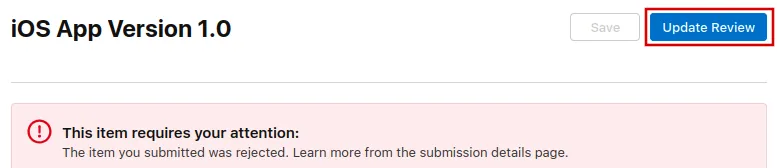
Następnie kliknij „Resubmit to App Review” na kolejnej stronie, która się otworzy.

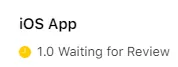
Powinno się wtedy pojawić "Oczekiwanie na recenzję".