Apple heeft de app afgewezen omdat deze een inlogmogelijkheid van een externe partij aanbiedt, zoals Google of Facebook, zonder een gelijkwaardige inlogoptie die aan de privacyvereisten van Apple voldoet (in de praktijk is dit 'Log in met Apple').
Voor de meeste apps die op een website zijn gebaseerd, is de eenvoudigste oplossing om de sociale inlogopties in de app te verwijderen en gebruikers in plaats daarvan te laten inloggen via het eigen accountsysteem van je website.
Verberg de inlogknoppen van externe partijen
Zorg er eerst voor dat gebruikers zonder een sociale inlogprovider een account kunnen aanmaken en kunnen inloggen, bijvoorbeeld met een e-mailadres en wachtwoord. Bestaande gebruikers die zich oorspronkelijk via Google of Facebook hebben geregistreerd, moeten ook toegang tot hun bestaande account kunnen krijgen.
Je kunt de sociale inlogknoppen van je website verwijderen of ze alleen in de app verbergen. Open de instellingen voor websiteaanpassingen van je app.Onze handleiding legt uit hoe je website-elementen kunt verbergen met selectors voor het verbergen van elementen.
Controleer alle plaatsen waar gebruikers kunnen inloggen of een account kunnen aanmaken, waaronder inlogpagina's, registratiepagina's, betaalpagina's en inlogpop-ups. Verberg op al deze plaatsen de inlogopties van externe partijen, maar houd je eigen inlogformulier beschikbaar.
Alternatief: behoud sociaal inloggen
Als sociaal inloggen belangrijk is voor je app, kun je Log in met Apple in je website integreren.
De app opnieuw indienen voor review
Als dit de laatste of enige reden was voor de afkeuring van je app, volg dan deze stappen om je app opnieuw in te dienen voor review:
Ga naar de versiepagina door bovenaan je scherm op "Distribution" te klikken of op het versienummer in het menu links.

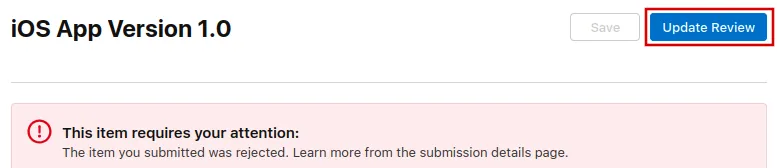
Klik nu rechtsboven op de knop "Update Review".
Klik daarna op "Resubmit to App Review" op de volgende pagina die opent.

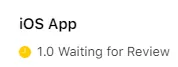
Er moet dan staan ‘Waiting for Review’ (‘Wachten op beoordeling’).