Apple rifiuta le app che permettono agli utenti di creare un account ma non consentono anche di avviare l’eliminazione dell’account dall’interno dell’app.
Soluzione migliore: offri l’eliminazione dell’account sul tuo sito web
Per le app basate su siti web, la soluzione migliore di solito è aggiungere l’eliminazione dell’account direttamente al tuo sito. In questo modo la funzionalità funziona allo stesso modo sul web e nell’app.
La configurazione ideale è un’opzione self-service per eliminare l’account nell’area account dell’utente. Se al momento è troppo difficile da realizzare, può andare bene anche un modulo dedicato per la richiesta di eliminazione dell’account.
Se usi un modulo di richiesta, deve essere specifico per l’eliminazione dell’account. Apple non accetta un modulo di supporto generico in cui l’eliminazione dell’account è solo uno dei tanti argomenti.
Soluzione alternativa: usa la funzionalità integrata dell’app
Puoi anche usare la funzionalità integrata dell’app per l’eliminazione dell’account. Puoi trovare maggiori informazioni su come attivarla qui. Assicurati solo che la schermata delle impostazioni che contiene la funzionalità di eliminazione dell’account sia accessibile nella tua app.
Di’ ad Apple dove trovarla
Dopo aver aggiunto la funzionalità di eliminazione dell’account, rispondi ad Apple e indica esattamente dove trovarla nell’app.
Se stai usando la funzionalità integrata dell’app per l’eliminazione dell’account, la spiegazione può essere qualcosa del genere:
- Se stai usando il layout con drawer: Puoi trovare la funzionalità per eliminare l’account qui: Menu laterale -> Impostazioni -> Elimina dati
- Se stai usando il layout con barra di navigazione: Puoi trovare la funzionalità per eliminare l’account nelle impostazioni (in basso a destra nella barra di navigazione)
Se hai aggiunto la funzionalità di eliminazione dell’account al tuo sito web, spiega come raggiungerla.
Se Apple ha rifiutato l’app una seconda volta perché non riesce ancora a trovare la funzionalità anche se hai descritto i passaggi, invia una registrazione dello schermo in cui navighi fino alla funzionalità di eliminazione dell’account nell’app.
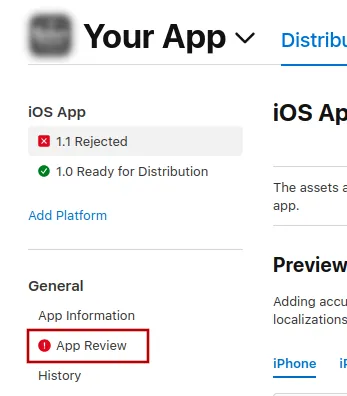
Per inviare un messaggio ad Apple, clicca "App Review".
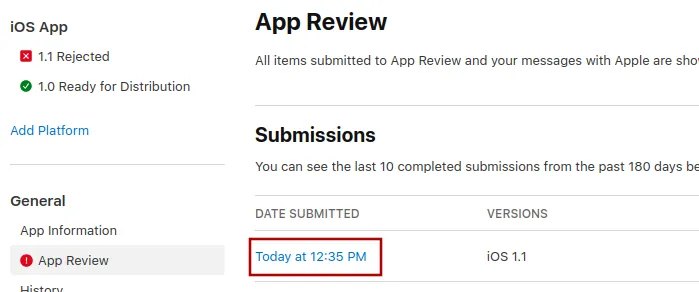
Lì, seleziona l’invio più recente.
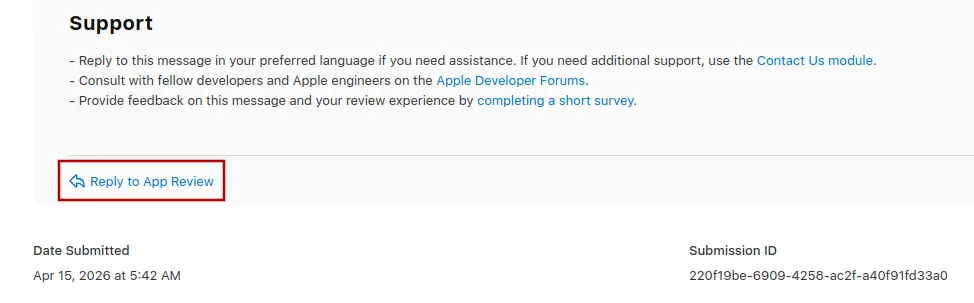
Ora puoi scorrere fino in fondo al messaggio di rifiuto di Apple e cliccare "Reply to App Review" e scrivere il tuo messaggio nel popup che si apre.
Inviare di nuovo l’app in revisione
Se questo era l’ultimo o l’unico motivo di rifiuto dell’app, segui questi passaggi per inviare di nuovo la tua app in revisione:
Vai alla pagina della versione cliccando "Distribution" in alto sullo schermo oppure il numero di versione nel menu a sinistra.

Ora clicca il pulsante "Update Review" in alto a destra.
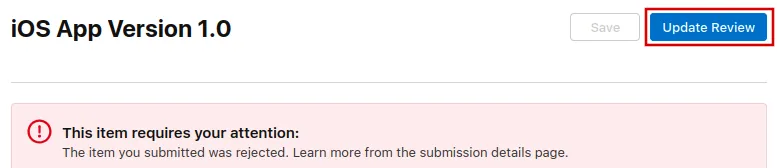
Dopo, nella pagina successiva che si apre, clicca "Resubmit to App Review".

Dovrebbe poi apparire la scritta "In attesa di revisione".